Category: php

  • eBay Search URL Structure Explained

    One of the things I have found very hard as an eBay API developer (with two certified applications) is the eBay search results page URL structure. My latest project requires me to build more complex eBay search URL structures on the fly. Below I explain how to create eBay URLs on the fly based on my understanding.

    The search will return BIN only items, items available to certain countries, search title and desc, select a category, include a price range and show the eBay “welcome new user banner”. There are of course more variables possible but this is a good start.

    The link above is a search for a “4gb ipod nano product red” the query section of the search should be simple enough to spot. You replace the spaces with “-” and append the search string to the search.ebay.com.

    If you wish to then start exploring more complex variables you append _W0 to tell eBay search they are coming and then each variable is preceeded by QQ. The order of the variables appears not to matter.

    So there you have an outline of some of the main variables in the eBay advanced search URLs, this definitely prooved really useful for me to create my little application, I hope it’s useful for you.
    Get my marketing cheat sheets at Click Here
  • eBay Related Searches through Get Search Results

    Ok I am simply blown away by the latest offering from the eBay API as an awesome way to make a bunch of money. eBay is now revealing (without the data + formula behind it of course) the results of their related searches algorithm. When you search on eBay for “tmx” on eBay at the moment it will give you 937 items but just above that it will give you the following related searches: ps3, wii, tmx elmo, tickle me elmo, playstation 3

    This is really useful information you can use to determine (as a paid search advertiser for example) hey I don’t want to buy keyword “tmx” it’s too pricey but keyword “tickle me elmo” is closely related… I will buy that instead and send the clicks to the same page as TMX. This data is quite simply awesome and exposed world wide for free. Make use of it and you’ll do great, esp. as an ebay affiliate and you can access it via the REST API, I am playing with this and a little bit of MAA right now 🙂

    Get my marketing cheat sheets at Click Here
  • Running a PHP script with a Cron job in 1and1

    Following on from running my first cron job with 1and1 hosting what I really wanted to do was to be able to run a php script, perl script or some other form of script on a timed basis. This article is a description of setting up a cron job on 1and1 hosting to run a simple “hello world” style example.

    First I set up my helloworld.php script, this was a simple script to create a file called helloworld.txt and write the words “hello world” to that file and save it.

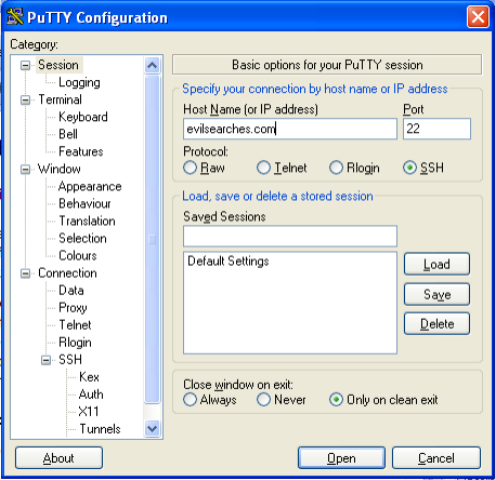
    I tested this file by running it on my server and it worked fine. The next thing I had to do was log on to my 1and1 server using SSH, the program I use for this is PuTTY which I have been using since university and works well. The next two steps you have to go through are: 1. to find the location of your current directory: enter “pwd” to find this. 2. to find the location of php on your machine.

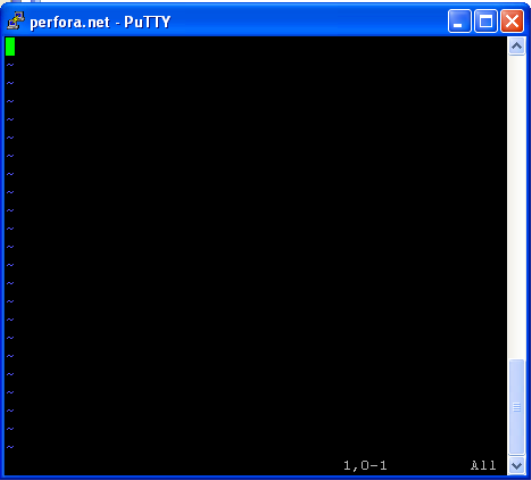
    Now I had to create my crontab file. So I entered the command “crontab -e” (which means edit crontab) and came to the VI editor. Using this command I found that on 1and1 hosting my helloworld.txt file was updated between 14 and 18minutes past every hour.

    I know this description would have helped me had it been available when I was looking for information on running a php file through a cron job on 1and1. I hope it helps you.

    Get my marketing cheat sheets at Click Here
  • My First Cron Job with 1and1 hosting

    A cron job is a way in Linux of getting a command to run on a schedule of your choosing. That command can be a script or a basic Linux command string such as copying a file. For me being able to execute cron jobs on my server was a key gap in my arsenal of web development skills that has led to me building all kinds of strange hacks to run timed jobs.

    This weekend I set myself 3 tasks: 1. start my green card application, 2. find somewhere to start taking GMAT lessons and 3. learn how to do a cron job. In order to start this I needed a cheap host which provides linux hosting with cron jobs and the obvious choice seemed to be 1and1 hosting. I have spent much of today reading how terrible 1and1 hosting is and beating myself around the head with trying to get a cron job working on 1and1 shared hosting.

    Firstly you must SSH into your 1and1 hosting, I like to use PuTTY to do this. You then have to log in to the SSH once connected using your FTP username and password from 1and1.

    Having confirmed I could run these commands myself I wanted to create a cron job to execute the command. To edit my cron job I needed to create a crontab. The command to open and edit a crontab is “crontab -e”.

    This is the vi editor which is the editor 1and1 uses on debian linux. I personally was trained on emacs and so it was a bit tricky getting used to this editor.

    Fingers crossed I will be able to do something cleverer with my crontab soon involving scripts and when I can I will share that here because I am suffering extreme frustration finding information on and working out how to do anything with scripts and crontabs on 1and1.

    Get my marketing cheat sheets at Click Here
  • Starting To Promote the Widget

    Today I made a change to the cocktail making widget I have blogged about a couple of times. I added a link at the bottom saying “get this on your blog” and linking back to the widget generation page. We will see how that does in trying to convince people to add this widget to their blog. I am pretty excited about the potential though, one month in and a couple of large blogs have started using the widget (most notably get real denver) which means the widget is now at well over 10 000 views a day. I was thinking if I could convince just 2 of those viewers daily (0.02% of those who see the widget) to install the widget I could hit 1000 blogs in a year (with the blogs already signed up and not taking into account the exponential growth potential).

    I am going to be really interested to see how this experiment grows and am already wondering what I can make my next experiment do!!!

    Get my marketing cheat sheets at Click Here
  • Creating Image Thumbnails with PHP

    Today I have been working on my butterfly tattoos website. There is a lot more to come on that website, I have ideas for Flickr integrations and more. At the moment I am getting c. 500 unique users a day passing through the site and I have made 0 changes since 2004. This site needs to be brought up to date. One way I am looking to do this is through enabling users to simply upload their own photographs (this will help me too since I have about 50 tattoos sitting ready to be uploaded). A key part of this is to do all the image handling on the server with pre-existing PHP functions. While working on this idea I found the following code source “create square image thumbnails with PHP“.

    This code uses the simple but very powerful GD graphics utilities that come with PHP 4 and 5. I have used them a lot and I won’t reproduce his code here however I will show my use of the code. I create a function which I store in a seperate include and can be called any time. The function will return “none” if there has been no error or will return an error like “I don’t support images of the type image/bmp support png, jpg and gif try converting to that and uploading” if an image format I don’t support is sent.

    The best bit of this code in my opinion is the ability to crop the image to a square while maintaining aspect ratio. This is managed by the imagecopyresampled() php function.

    Get my marketing cheat sheets at Click Here
  • PHP mySQL close connection

    So I have been creating lots of new features for me to maintain my cocktail making website. One feature has involved me setting up a new mySQL 5.0 database (with cool stored procedures I am only starting to understand now) in order to do some tracking of what is happening on the site and with my widget. This has required me to use two databases at once for the first time. One to check if a user is signed in with admin rights and the other to check the tracking out of the other database (php security is really tricky so I am slightly nervous posting even this here :s ).

    However I did want to note how you close a connection with a mysql database using PHP in order to open one with another mysql database since it’s really simple but I found it hard to get info. So when you open databases try closing them, I know I will in future for good practice, it makes everything much simpler if you add another database at a later stage.

    Get my marketing cheat sheets at Click Here
  • Graphing Search Result Numbers Over Time

    So I have had a random idea for a little project that could be fun. We all know about Google Trends, eBay Pulse, the Overture Search Suggestion tool. Now I think all of these are truly amazing tools. Something we don’t neccessarily know about is the supply side of this equation. All of a sudden that is really interesting me. It would be relatively simple to set up a CRON job that runs once daily and pulls the abundance through the various API’s available. It could also be really fun to see how trends shift over time (perhaps looping in Technorati and a couple of other sources). It could even be a fun tool for an eBay seller to help me monetize it a little bit… hmm I think I may build this at the weekend and if I do I will post the resulting graphs on this blog as well as on a little site I recently purchased with 1 and 1. YAY!

    Get my marketing cheat sheets at Click Here
  • How to use the Typepad Widget API with PHP

    The Typepad Widget API is awesome. The concept is that you have a great widget you want users to add to their sidebar. Typepad want this to be a small self contained piece of DHTML code and want to be able to do all the verification of the user on their side without giving the widget owner any access to the user’s account.

    Browser based authentication used at both the eBay and Yahoo! developer programs (and explained beautifully in diagram form on the Yahoo! site) simply won’t work for this since it gives the programmer access to your eBay/Yahoo/Typepad account (were they to use it). So Typepad found a solution to the problem that is really simple and elegant.

    All data is sent to the API in a POST command along with redirecting the user themselves (rather than just a server to server POST call). Typepad’s Widget API requires fields identifying you as a developer, your application, what it is called, verifying you are who you say you are (with a token) and finally containing the FULL HTML you want inserted in the user’s sidebar to be sent to them through the POST command.

    The user then lands at a Typepad log in page and all the data is carried through with them to a page where they can effectively suggest whether or not to keep the Typepad widget. GREAT!

    I love this method, it’s secure, clever, simple and behaves exactly as you would expect… Having worked with Google AdWords/Base/Adsense APIs, Yahoo! APIs, eBay APIs and a fair few others I have to say this Typepad Widget API has been the simplest yet. Well done Typepad!

    Get my marketing cheat sheets at Click Here
  • Using PHP setcookie() for an adsense test

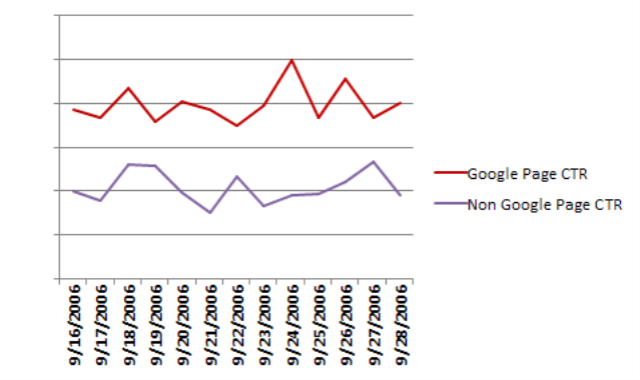
    I have wondered for a long time whether people who come to my site via google behave differently in respect to ads than other users. There are lots of reasons for wondering this but specifically for now I am thinking that potentially someone who has just come from google may be more likely to click on an adsense link than someone who has come from somewhere else.

    Thankfully I have 10s of k’s of ad impressions daily to test this on and the technology isn’t exactly challenging. I have set up a cookie on every page of my largest site that drops on a users computer once every 72hrs where they have been referred from.

    Then lower down the page on every page I have a similar include that powers my advertising. Within this include I read in the cookie and test whether it contains the string “.google.” (not perfect I know but good enough for my purposes.

    Note the === in the strpos() function is because strpos() doesn’t always return false when it is false therefore you have to look for responses equivalent to false (===) rather than just equal to false (==). So for me this looks like it could be a really interesting test, I will of course paste the results of the test here and if there’s any substantial difference in results I will of course make changes to capitalize.

    I may choose later to also split out people with cookie blocking (since I love vinny’s article) and see how they behave but for now I will just let the results tick over like this for a couple of weeks.

    Get my marketing cheat sheets at Click Here